
If you are from the 2000s or before you must have seen those screens that we refered to as B/W monitors. Now Technically what B/W means is a binary image i.e., pixel internsity at every location is high(1) or low(0).
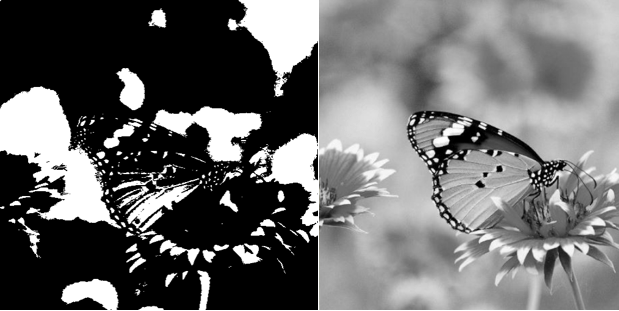
The very sense of depth, common regions and variability is lost when we have a B/W image. The image above on left is almost un-interpretable if viewed alone.
So what is a grayscale image?
Image which not only is made of black(0) and white(1) pixels but also by pixels which are gray(in range 0-1) with some percent of black content plus white content. In many classical computer vision techniques we prefer using grayscale image as it is easier to work with single grayscale channel compared to three channels(R,G,B). Also, most of the important information is preserved when we change a RGB to grayscale, so it is a good trade-off.
You can use the python code below to convert a colored image to B/W or Grayscale using OpenCV library.
import cv2

originalImage = cv2.imread('-ImageLocation-')
grayImage = cv2.cvtColor(originalImage, cv2.COLOR_BGR2GRAY)

(thresh, blackAndWhiteImage) = cv2.threshold(grayImage, 127, 255, cv2.THRESH_BINARY)

cv2.imshow('Black white image', blackAndWhiteImage)
cv2.imshow('Original image',originalImage)
cv2.imshow('Gray image', grayImage)

cv2.waitKey(0)
cv2.destroyAllWindows()
So this was a Quickie on BW and Grayscale images. Drop your questions below. Also write what you would like to see next.
 Pixel Dance(PixelPie.org)